Key takeaways
- Start an on-page audit by confirming the page’s search task and owner keyword family, not by counting keyword repetitions.
- Review the page as one connected answer: title, URL, H1, headings, main copy, evidence, links and images should all support the same intent.
- Record evidence for every pass or fail so another person can reproduce the finding and understand the recommended fix.
- Separate content and page-element issues from crawling, indexing or rendering problems that belong in a technical SEO diagnosis.
- Prioritise changes by user impact, search impact, confidence and effort instead of treating every checklist item as equally urgent.
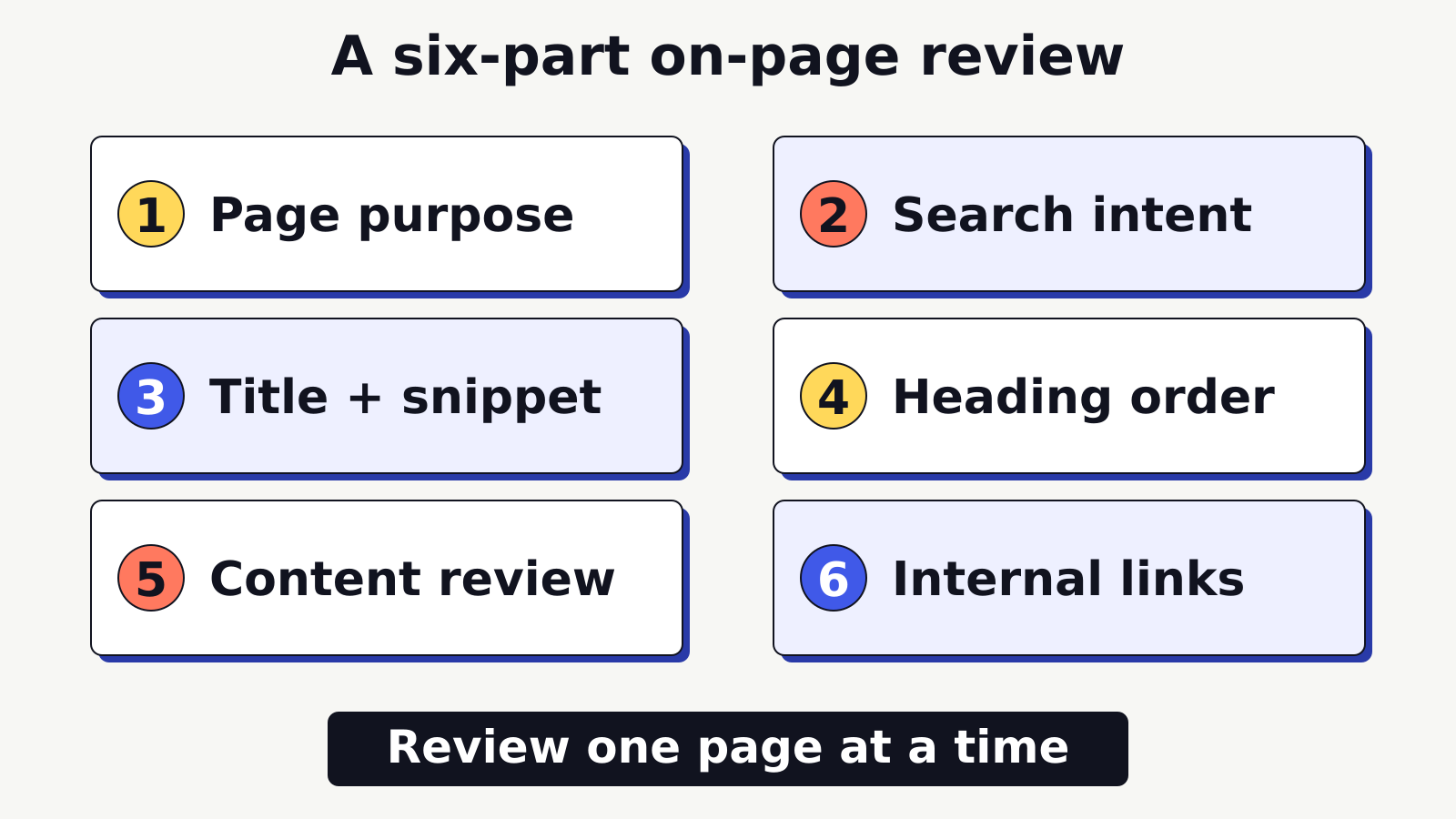
Start an on-page SEO checklist with what the reader came to do. Check whether the title, headings and copy help them do it, then look at the links, images and search snippet.
A checklist is useful only when it helps you make a decision. A green tick should mean you inspected something specific and found acceptable evidence. A red mark should describe the problem, where it appears and what a better version needs to do. This approach is more useful than chasing a perfect score from an audit tool because the score cannot decide whether the page gives a clear, accurate and satisfying answer.
This beginner workflow focuses on one page at a time. It covers page content and the elements that frame that content. If the page cannot be crawled, rendered or indexed, record that as a technical issue and diagnose it separately rather than rewriting copy blindly.
What an on-page SEO audit should prove
An on-page audit should prove three things. First, the page has a distinct search task. Second, its visible content fulfils that task. Third, its page elements communicate the same meaning without misleading people or search systems.
Ask a plain question before opening an audit tool: would a person who made the target search consider this page a complete and credible next step? The answer depends on usefulness, not the number of times a phrase appears. A service page may need scope, process, limitations and a clear enquiry path. A tutorial may need definitions, ordered steps, examples and checks. A comparison may need criteria, trade-offs and a decision method. The format should fit the task.
Google’s SEO Starter Guide recommends useful, reliable, people-first content, logical organisation, descriptive links, accurate titles and contextual images. It does not prescribe a universal word count or keyword-density target. Treat length as a consequence of answering the task, not as an objective by itself.
Create a small audit brief before reviewing details:
| Audit field | What to record | Why it matters |
|---|---|---|
| Page URL | The exact canonical-looking URL being reviewed | Prevents findings from being attached to the wrong version |
| Intended audience | The reader and their situation | Keeps examples, language and depth relevant |
| Primary search task | Learn, compare, complete, visit or buy | Sets the expected page format and next step |
| Owner topic | The keyword family this page should own | Exposes overlap with other site pages |
| Expected outcome | What the reader should understand or do | Gives the audit a clear success test |
| Evidence date | The date of the review and source checks | Makes freshness decisions traceable |
The page does not need to satisfy every possible audience. It needs a defensible purpose. If the brief cannot be completed in one or two sentences, the page may be mixing several tasks or the target topic may still be too broad.
Pro Tip
Write the intended answer in one sentence before reading the existing copy. Then compare that sentence with the title, H1, opening paragraph and conclusion. Misalignment becomes much easier to see when you have a fixed reference.
Start with search intent and page ownership
Search intent describes what the searcher is trying to accomplish. Page ownership identifies which URL on your site is responsible for that intent. Review both before editing titles or adding sections.
Use the live search results as evidence, not as a script to copy. Look for the formats that repeatedly appear: guides, category pages, tools, product pages, local results, videos or short definitions. Note the questions and distinctions that help explain the task. Then decide whether your page is the right type of page to compete for it. If you need a more detailed method, use SERA’s guide to identify the page’s search intent.
Intent is not just a label such as informational or commercial. Record what the reader likely knows already, what decision they need to make and what evidence would reduce uncertainty. For example, a query for an audit checklist suggests that the reader wants a usable sequence, pass or fail criteria and a way to prioritise findings. A general essay about why SEO matters would not fulfil that task even if it used the target phrase often.
Next, check ownership. Search the site for pages targeting the same topic and compare their titles, H1s and purposes. One page should normally lead each closely related keyword family, while supporting pages answer narrower questions and link to the owner where useful. Use the beginner keyword research process to understand query language, then assign one owner URL to each keyword family before substantial rewriting.
Record overlap instead of immediately deleting or merging anything. Two pages may share vocabulary while serving different tasks. A checklist and a technical diagnosis guide both discuss SEO, but one reviews the visible page and the other investigates access, status, indexing and rendering. Their boundaries should remain clear.
Run these ownership checks:
- Search the site for the primary phrase and close variants.
- List any URLs that appear to answer the same task.
- Compare each page’s intended audience, format and conversion step.
- Choose the strongest owner or flag the decision for review.
- Rewrite only after ownership is settled.
Do not assume a new page must be created because a phrase is missing from a title. An existing page may already own the task and need a focused improvement. Equally, do not force unrelated intent into an established page merely to avoid creating a new one.
Review the title tag, URL and search snippet
The title tag, URL and search snippet help people decide whether the page is relevant before they visit. They should set an accurate expectation and distinguish the page from other results without exaggeration.
Review the title tag for five qualities:
- It identifies the page’s main subject early and naturally.
- It matches the actual page type, such as guide, checklist or comparison.
- It is specific enough to distinguish the page from nearby site content.
- It avoids repetition, vague claims and unsupported superlatives.
- It remains understandable if a search system rewrites how it appears.
Google explains that title links can be generated from several page signals, including the title element, the main visible title and prominent text. Its title-link guidance recommends descriptive, concise titles and warns against boilerplate and keyword stuffing. This means the title tag and H1 should reinforce one another even when they are not character-for-character identical.
Do not audit title quality by a rigid character rule alone. Pixel width, device, query and result treatment affect display. A preview can help catch an obviously unwieldy title, but it cannot guarantee exactly how the result will appear. Check meaning first, then reduce unnecessary words.
The URL should be readable, stable and representative of the page. Prefer a short descriptive slug over dates, internal IDs or a string of repeated keywords. Do not change a live URL merely for cosmetic perfection. A URL change can require redirects, internal-link updates, sitemap updates and monitoring. Record the business case and implementation needs before recommending it.
For the search snippet, inspect the meta description and the page passage most likely to answer the query. Google’s snippet documentation explains that snippets are primarily created from page content and may use the meta description when it better describes the page. Write a concise, page-specific description, but do not promise that it will always appear.
Use this pass or fail test:
| Element | Pass evidence | Fix when |
|---|---|---|
| Title tag | Specific subject and page type, aligned with content | Vague, duplicated, stuffed or misleading |
| URL | Stable and readable owner URL | Wrong topic, avoidable parameters or an approved migration need |
| Meta description | Accurate summary and useful distinction | Generic boilerplate, missing context or unsupported promise |
| Snippet source copy | Opening and relevant sections answer clearly | Important answer is buried or described ambiguously |
Meta keywords are not part of this workflow. Do not spend audit time filling a meta-keywords field. Put that effort into a useful title, a clear opening answer and content that earns the click it invites.
Check the H1 and heading structure
The H1 should name the page clearly. The remaining headings should create a logical reading path. A reader scanning only the headings ought to understand the sequence of the answer.
Confirm that the template supplies one meaningful H1 and that the body does not introduce a second competing H1. The exact implementation can vary by content management system, so inspect the rendered page rather than relying only on the editor label. A visually large paragraph is not necessarily an H1, and a hidden duplicate can still exist in the source.
Then read the headings without the paragraphs beneath them. Check whether each heading introduces a distinct section, whether the order follows the reader’s decisions and whether vague labels such as “More information” can be made specific. Headings should describe the section rather than carry a complete list of keywords.
A useful sequence for a beginner guide is often:
- Define the problem and desired outcome.
- Establish the decision criteria.
- Explain the workflow in a sensible order.
- Show an example or comparison.
- Provide a checklist for action.
- Address common questions and limits.
Hierarchy matters because it communicates relationships. Do not choose a heading level only for its visual size. If a design needs smaller or larger text, styling should handle that. The content structure should remain meaningful.
Check whether headings and body copy use the language a reader would recognise. Google’s Search Essentials advises using words people would use to look for the content in prominent locations such as the title, main heading, alt text and link text. That does not justify repeating the same phrase in every heading. Use exact language where it clarifies the topic, then use natural related terms to explain it.
Pro Tip
Paste only the page’s headings into a blank document. If they read like a coherent outline and no two headings promise the same section, the structure is probably sound. If the outline feels jumpy, fix the sequence before polishing sentences.
Test whether the main copy answers the query
Main copy should answer the primary question early, develop the answer with evidence and give the reader a useful next step. Audit it from the reader’s perspective before checking phrase placement.
Start with the first paragraph. It should identify the topic, answer the central question and establish the scope. Avoid a long scene-setting introduction that delays the useful answer. For a checklist article, the reader needs to know what will be checked and in what order. For a service page, the reader needs to know what is offered, for whom and under what conditions.
Next, test coverage. Break the search task into sub-questions and mark where each is answered. Missing coverage is not the same as low word count. A long article can repeat definitions while omitting the decision criteria. A short page can be sufficient when the task is narrow. Use page purpose, not a competitor average alone, to decide what depth is needed.
Assess each section for four qualities:
| Quality | Audit question | Evidence to capture |
|---|---|---|
| Directness | Does the section answer its heading immediately? | First one or two sentences |
| Completeness | Are the important conditions and limits included? | Covered and missing sub-questions |
| Specificity | Are examples, steps or criteria concrete? | A representative passage |
| Trust | Can factual claims be checked? | Primary source, named method or clear scope |
Look for unsupported claims, stale screenshots, unexplained jargon and examples that appear to be real but are not sourced. Replace absolute statements with accurate limits. If a platform’s interface can change, explain the principle and record the research date rather than pretending the labels are permanent.
Use original examples to make abstract advice testable. Consider a fictional Ahmedabad tutoring page. Its title promises “Maths Tuition in Ahmedabad”, its H1 says “Welcome to Our Learning Centre”, and its opening paragraph discusses all school subjects without stating the class levels, learning format or location served. The page has not failed because a keyword is missing a certain number of times. It has failed because the title, main heading and answer do not support one clear task.
A useful revision might make the H1 identify the specific maths tuition offer, make the opening explain the class range and format, and add sections for teaching approach, schedule, location and enquiry conditions. Those changes improve alignment. They do not prove that the page will rank, and the audit should not invent a performance result.
Check language quality at the end, not the beginning. Remove filler, repeated conclusions and generic claims. Define necessary technical terms on first use. Read the copy aloud to catch overlong sentences. Confirm Indian English conventions, punctuation and numbers are consistent.
When the topic needs research, prefer primary sources and link them where the claim is made. A source list cannot rescue a claim that the source does not actually support. Open each citation, verify its scope and record the access date in the private audit notes.
Audit internal links and anchor text
Internal links should help readers discover a relevant next step and help search systems understand relationships between pages. Audit their purpose, destination, anchor text and placement.
First, check links pointing from the page. Each link should support the sentence around it. Replace vague anchors such as “click here” or “read more” with concise text that describes the destination. Avoid forcing the same exact anchor repeatedly. Google’s starter guidance recommends concise, relevant anchor text and crawlable links, while warning against excessive linking.
Second, check links pointing to the page. Important owner pages should not be isolated. Find relevant published pages that mention the topic but do not link to the owner. Recommend links only where they improve the reader’s path. A large number of unrelated links is not a substitute for a clear site structure.
Third, test destinations. Record broken links, redirects, protocol mismatches and links to drafts or restricted pages. Do not invent a destination because an ideal supporting asset is planned. Use only a verified live URL in publishable copy.
For every internal link, ask:
- Would a reader reasonably want this detail at this point?
- Does the anchor describe the destination without overselling it?
- Is the destination the current owner of that topic?
- Does the link work and resolve to the intended page?
- Is the same destination repeated unnecessarily nearby?
Return to the fictional tutoring page. An image caption says “View our class schedule” but links to the home page, while a paragraph uses “click here” for the actual schedule. A better audit recommendation would point the descriptive schedule anchor to the verified schedule page and remove the misleading link. The evidence should include the source sentence, anchor and destination URL.
Do not turn this article into a complete internal-linking strategy. The on-page decision is narrower: are this page’s links useful, descriptive, live and aligned with ownership?
Review images, tables and accessibility
Images and tables should explain something the surrounding text cannot communicate as efficiently. Audit their purpose before optimising their files.
For each image, check that it is relevant, sharp at its rendered size and placed near the text it supports. Inspect width and height behaviour on desktop and mobile so the image does not stretch, crop essential information or cause horizontal scrolling. Compress sensibly while preserving legibility.
Alt text should communicate the image’s useful content in context. It is not a place to insert a keyword list. Decorative images can often use empty alt text so assistive technology can skip them. Functional images, such as a linked icon or button, need text that explains the action. Google’s image SEO guidance recommends high-quality images near relevant text and descriptive alt text.
The fictional tutoring page uses the alt text “image” for a diagram showing the route from a nearby landmark to the learning centre. That text does not convey the diagram’s purpose. A better alternative would describe the route and landmark briefly, provided the visual contains that information. If the diagram includes essential directions, repeat those directions as text so the information is not available only through an image.
Review tables for meaning and usability:
- Give the table a clear introduction or caption.
- Use column headers that describe the values beneath them.
- Keep cell content concise and avoid unexplained abbreviations.
- Check reading order and wrapping on a narrow screen.
- Do not use a table merely to create a visual layout.
- Provide surrounding explanation for the decision the table supports.
Also inspect colour contrast, visible keyboard focus, descriptive button text and labelled form fields if they appear within the page content. Some accessibility issues belong to the shared template, but article-specific images, tables and links remain part of the on-page audit. Record which layer owns each fix.
Pro Tip
Review each image once with it visible and once with it hidden. If essential meaning disappears when the image is hidden, confirm that the alt text or adjacent copy supplies that meaning. If nothing useful disappears, the image may be decorative.
Check evidence, authorship and freshness
Trust grows when readers can see who is responsible for the page, how claims are supported and when time-sensitive information was checked. Audit these signals according to the topic’s risk and freshness needs.
Check whether factual claims link to an official or primary source when one exists. Make sure the source supports the exact statement, not merely the broad subject. If the article reports an observation from a live interface or search result, label it as an observation, record the date and avoid generalising from a tiny sample.
Review author information for relevance and accuracy. A byline alone is not proof of expertise, but anonymous claims with no accountable publisher can leave readers unable to assess the source. Confirm that the author or reviewer details shown are current and that the page does not invent credentials.
Freshness should be meaningful. A changed date without a substantive review does not improve the content. Identify which elements can become stale, such as regulations, prices, schedules, interface steps, product availability or statistics. Verify those elements, update the copy and note the scope of the review. Evergreen explanations may not need frequent rewriting, but their links and examples can still break.
Use a simple freshness record:
| Item | Evidence checked | Action |
|---|---|---|
| Official guidance | Current primary page and access date | Keep, revise or remove claim |
| Internal links | Final destinations and response | Fix or replace failures |
| Screenshots | Interface and visible labels | Replace if misleading |
| Examples | Current relevance and clear fictional label | Refresh or clarify |
| Author details | Current profile and responsibility | Correct attribution |
Be especially careful with claims about rankings, traffic, income, employment or return on investment. A page should not promise an outcome that depends on competition, implementation, market conditions or user behaviour. Report verified results only when the underlying method, period and scope are available and publication is authorised.
Run the on-page SEO checklist
Use the following checklist after the qualitative review. Mark each line Pass, Fix, Not applicable or Needs owner decision. Add evidence and a named next action. Do not leave a red mark without explaining what would resolve it.
| Check | Pass condition | Evidence to save |
|---|---|---|
| Search task | One audience, task and outcome are clear | One-sentence intent statement |
| Page ownership | No unresolved same-intent owner conflict | Owner map and compared URLs |
| Page format | Format matches the task | SERP format notes and rationale |
| Title tag | Accurate, specific and aligned | Current title and proposed edit |
| URL | Stable, readable and appropriate | URL plus migration note if needed |
| Meta description | Page-specific and honest | Current and proposed description |
| H1 | One clear main heading | Rendered heading evidence |
| Heading order | Sections are unique and logically sequenced | Extracted outline |
| Opening answer | Topic and scope are clear immediately | Opening paragraph |
| Coverage | Key sub-questions are answered usefully | Coverage map |
| Examples | Concrete, accurate and properly labelled | Example passage |
| Claims | Important claims have suitable support | Claim-to-source notes |
| Internal links out | Useful, descriptive and live | Anchor and destination list |
| Internal links in | Relevant discovery paths exist | Source-page opportunities |
| Images | Relevant, sharp and contained | Rendered desktop and mobile view |
| Alt text | Conveys contextual image purpose | Alt-text list |
| Tables | Clear headers, wrapping and context | Narrow-screen check |
| Authorship | Responsibility is accurate and visible | Byline or reviewer evidence |
| Freshness | Time-sensitive details were checked | Review date and changed items |
| Final action | Reader has a sensible next step | CTA or completion step |
Run the checklist in a practical order. Intent and ownership come first because they determine whether the page should exist in its current form. Structure and coverage come next because they determine the answer. Metadata, links, images and polish follow. This order prevents a team from perfecting a title for a page that targets the wrong task.
Do a separate pre-publish pass:
- Preview the rendered page rather than trusting the editor view.
- Check title, H1, opening, headings and conclusion as one story.
- Open every internal and external link.
- Inspect tables, images and captions on a narrow screen.
- Check spelling, punctuation and unsupported absolutes.
- Confirm the owner slug and publication status.
- Save the audit evidence and responsible owner.
Avoid common checklist myths. There is no universally correct keyword density. There is no fixed article length that guarantees quality. Meta keywords are not a useful optimisation task for Google Search. Adding structured data does not make weak content useful or guarantee a special search appearance. Repeating an exact phrase in every heading can reduce clarity. The checklist should expose these habits, not reinforce them.
Prioritise fixes by impact and effort
An audit becomes useful when findings are converted into a sequence. Do not present twenty unrelated issues as if they have the same value.
Score each finding using four questions:
- User impact: Does the problem prevent understanding, trust or task completion?
- Search impact: Does it obscure intent, ownership, relevance or discovery?
- Confidence: Is the diagnosis supported by direct evidence?
- Effort and dependency: Can an editor fix it, or does it require design, development or approval?
Use a simple priority table:
| Priority | Typical finding | Recommended response |
|---|---|---|
| Act first | Wrong intent, owner conflict, misleading title, missing core answer | Resolve strategy before polishing |
| Act next | Weak structure, unsupported claim, broken important link | Assign a clear content fix |
| Schedule | Helpful example, image improvement, freshness update | Add to the next editorial pass |
| Monitor | Low-confidence concern or optional enhancement | Gather evidence before changing |
For the fictional tutoring page, the mismatched H1 and vague opening are higher priority than changing an image filename. The generic “click here” anchor matters if it blocks a useful path, but correcting it before clarifying the offer would not solve the page’s main problem. State that reasoning in the audit.
Assign each action to an owner and define completion evidence. “Improve content” is not an actionable recommendation. “Rewrite the opening to state the maths tuition format, class range and Ahmedabad location, then confirm it matches the title and H1” is testable. It can be reviewed without relying on a tool score.
Finish by distinguishing content work from technical work. If the page returns an unexpected status, is blocked from crawling, carries a noindex directive or has a canonical conflict, record the observation for technical diagnosis. Do not claim that a copy edit will fix an access problem.
Use the internal linking strategy for beginners when the audit exposes a wider page-mapping problem. If access, rendering or indexing is the obstacle, move to technical SEO for beginners before rewriting the page.
Practise turning search intent into reviewable pages.
Frequently Asked Questions
What is an on-page SEO checklist?
It is a repeatable review of one page’s intent, ownership, title, URL, headings, copy, links, images, evidence and freshness. A useful checklist records pass or fail evidence and the next action instead of producing a score without context.
What should I check first in an on-page audit?
Check the search task and owner URL first. If the page targets the wrong intent or overlaps another owner page, title and copy edits may deepen the conflict rather than solve it.
Is keyword density part of on-page SEO?
Do not optimise toward a fixed density. Use the primary topic naturally in prominent, useful locations, explain related concepts clearly and remove repetition that makes the page harder to read.
How often should a page be audited?
Audit after a substantial content or template change, when performance or search-result behaviour raises a question, or when time-sensitive claims become stale. Set a review interval based on change risk rather than applying one calendar rule to every page.
What is the difference between on-page and technical SEO?
On-page SEO reviews whether a page’s content and visible elements fulfil the intended search task. Technical SEO diagnoses discovery, crawling, rendering, indexing signals, status codes, canonicals and related implementation issues. The two interact, but they require different evidence and owners.

Mehul Shah
Mehul Shah is the founder and academic director of Sera Digital Marketing Academy in Ahmedabad. He has more than 11 years of experience in SEO, SaaS marketing and agency work. He writes about SEO, AI search and digital marketing, with a focus on how to audit websites, plan campaigns and measure results.