Key takeaways
- Use a practical diagnosis sequence: discovery, crawling, rendering, index status and supporting signals.
- Collect URL-level evidence before changing code, because a symptom such as non-indexing can have several different causes.
- Check access, HTTP status, indexability, canonical signals, internal discovery and rendered content before lower-priority enhancements.
- Separate single-URL, template-wide and site-wide failures so the right editor, developer or platform owner receives the issue.
- Treat structured data and performance improvements as useful checks, not as guarantees of indexing, rich results or rankings.
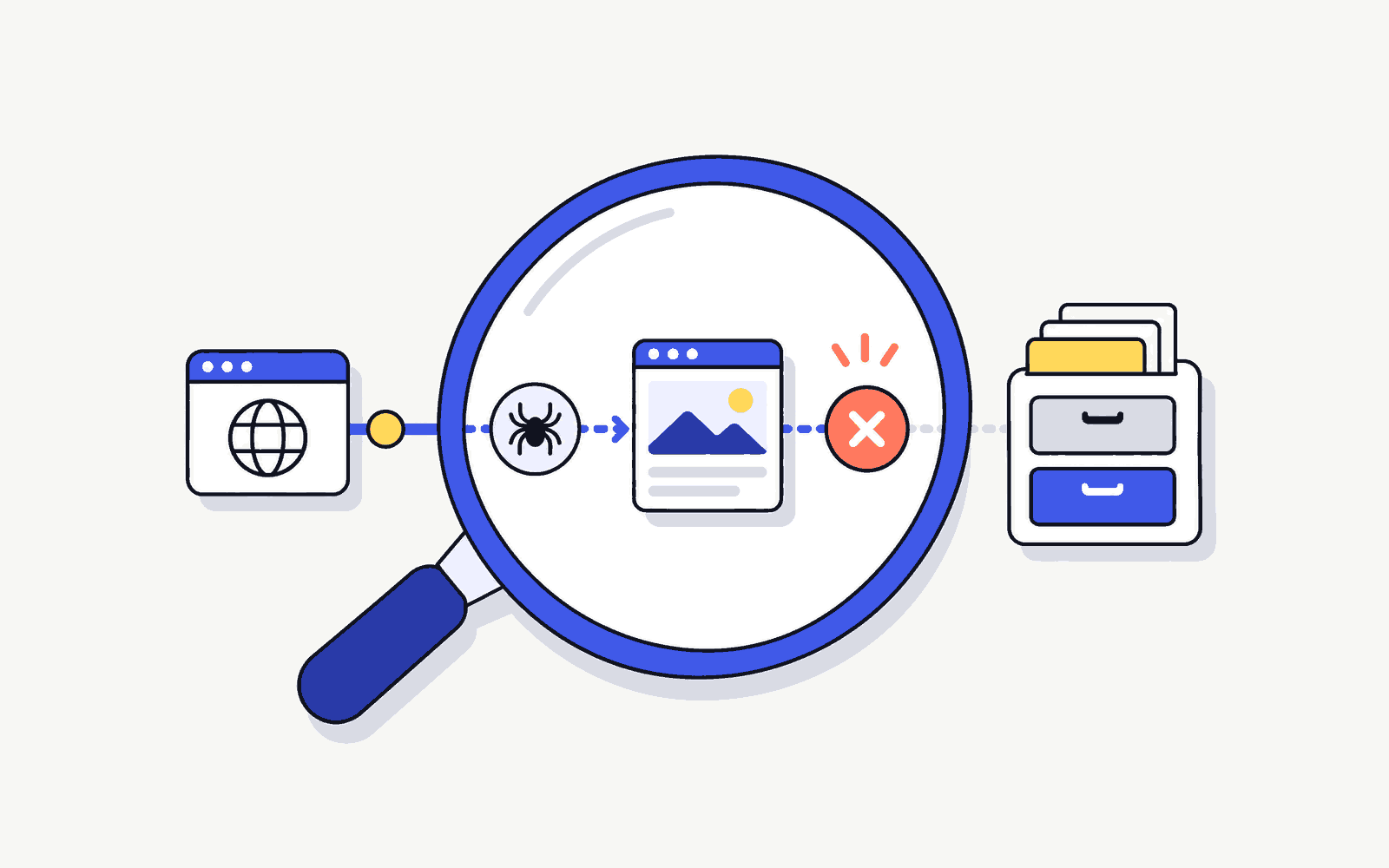
If a page is missing from search, start with a check you can repeat. Confirm the page loads, then check whether Google can crawl and index it. That order makes technical SEO easier to learn.
The goal is not to become a developer in one audit. It is to follow a defensible sequence, distinguish observations from hypotheses and hand off a reproducible problem. Technical SEO becomes manageable when each check answers one question about one URL, template or site layer.
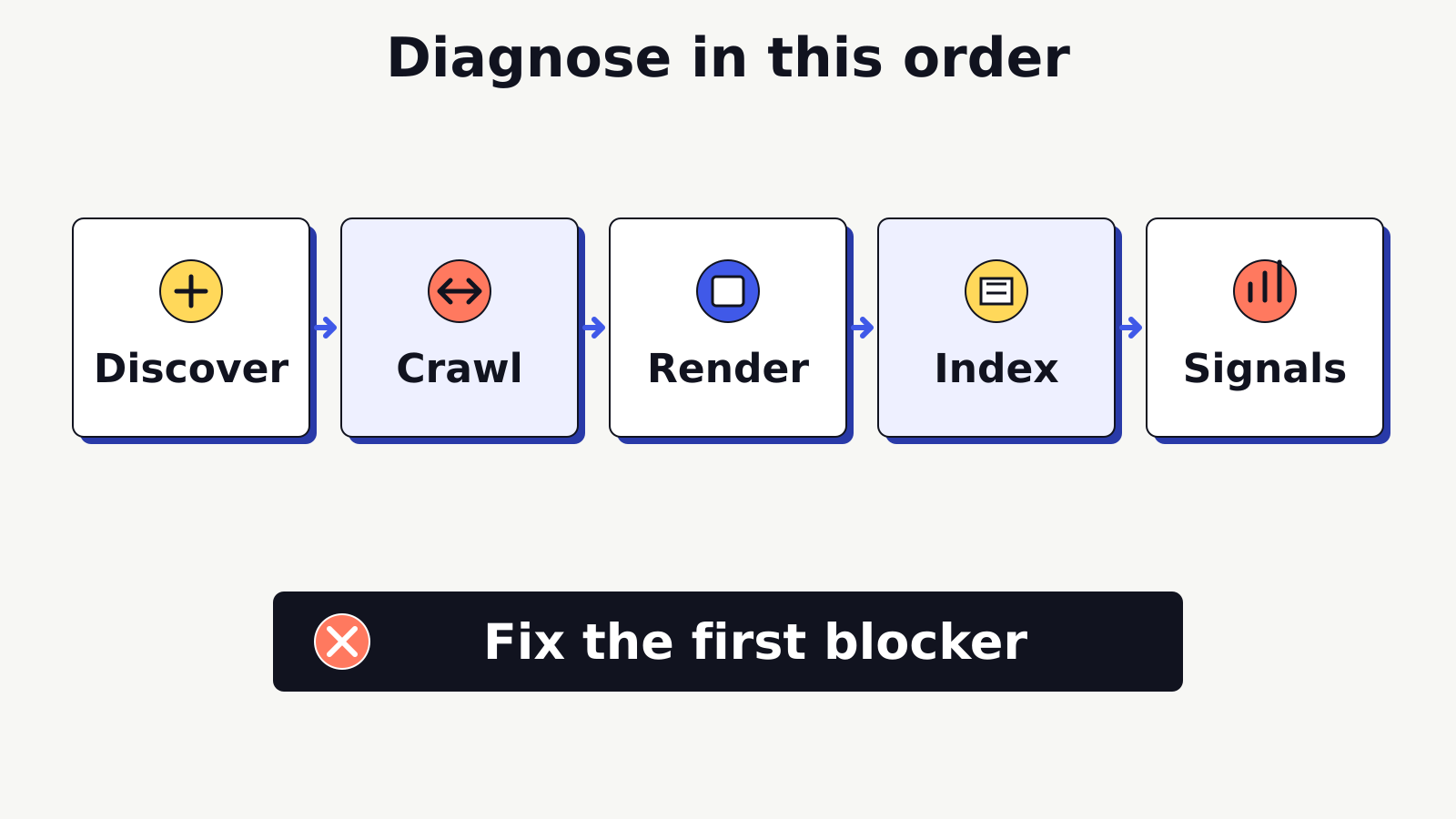
Use this diagnostic order throughout the article:
- Discover: can the system find the URL through a link or sitemap?
- Crawl: is the URL accessible to the relevant crawler?
- Render: can the system process the content and important links?
- Index: is the page eligible and selected for storage?
- Signals: do the preferred URL, mobile experience and other supporting signals describe the intended page consistently?
Do not skip directly to speed scores or schema warnings when an important page is blocked, redirects unexpectedly or is not indexable. Resolve the earliest broken stage first.
What technical SEO beginners should diagnose
A beginner technical audit should diagnose conditions, not promise outcomes. Your job is to identify what is happening, capture evidence, state the most likely layer and recommend the next safe check.
Google’s technical requirements provide a useful minimum: Googlebot must not be blocked, the page should return an HTTP 200 status, and it should contain indexable content. Meeting those requirements does not guarantee indexing. That limit is important because a technically accessible page can still be excluded, treated as a duplicate or judged unnecessary for a query.
Start by defining the scope:
| Scope | Example symptom | First comparison |
|---|---|---|
| Single URL | One article is not indexed | Another article using the same template |
| Template | All category pages omit canonical tags | A page from a different template |
| Site section | A subfolder is blocked | A working section with similar content |
| Site-wide | Most pages fail to load for crawlers | Home page, robots file and server response |
A single-URL failure may come from page settings or a one-off redirect. A repeated failure across one template often points to shared code or content management settings. A site-wide failure can involve server, network, deployment or global configuration. Identifying the scope prevents repetitive page edits when one shared fix is needed.
Use a severity label as well as a scope:
- Blocker: prevents access, returns the wrong response or makes an important page ineligible for indexing.
- High: sends conflicting preferred-URL signals, hides essential rendered content or breaks a key discovery path.
- Medium: weakens clarity, validation or experience but does not stop access to the main content.
- Monitor: low-confidence observation or enhancement that needs more evidence.
These labels are triage tools, not universal scoring rules. A 404 on an obsolete URL can be correct, while a 404 on a current conversion page is urgent. Severity depends on purpose and evidence.
Pro Tip
Keep an untouched evidence record before changing anything: tested URL, date, device or user agent where relevant, response, screenshot or export, and the tool used. A before-and-after record makes a developer handoff safer and a retest conclusive.
Confirm whether the page can be discovered
Discovery asks whether a search system has a path to the URL. A page can return 200 when requested directly and still be difficult to discover if no crawlable internal link points to it and it is absent from useful sitemap signals.
Begin with internal navigation and contextual links. Find the page by browsing from a known site entry point without using the address bar or site search. Inspect whether the link is a normal crawlable anchor with a usable destination. Links created only after an unsupported interaction or embedded in a way a crawler cannot process may not provide a dependable discovery path.
Then check the XML sitemap. Confirm that the sitemap is accessible, uses final preferred URLs and does not list obvious redirects, errors or non-indexable pages. A sitemap is a discovery signal, not a command to index every listed URL. Its value falls when it contains stale or conflicting URLs.
Review the site’s robots.txt file to see whether it blocks crawling of the URL path or resources needed to understand the page. A robots.txt rule controls crawling, not indexing eligibility by itself. Do not use robots.txt as a substitute for a noindex directive. Also remember that a crawler blocked by robots.txt may be unable to see a noindex directive on the page.
For a URL that appears undiscovered, capture:
- The nearest crawlable internal link and its source page.
- Whether the destination is the final URL or a redirect.
- Sitemap inclusion and the exact listed URL.
- Relevant robots.txt rules and the user agent they address.
- Search Console discovery information where access is authorised.
Google’s SEO Starter Guide recommends logical site organisation and descriptive crawlable links. Discovery should reflect real reader paths too. Adding a hidden or irrelevant link only for a crawler is not a useful information architecture fix.
For sites that publish content through JavaScript, inspect both the initial HTML and rendered page. A link visible to a user may be inserted only after a script runs. That does not automatically make it a problem, but it changes what evidence you need.
Separate crawling, indexing and ranking
Crawling, indexing and ranking are connected stages, not interchangeable labels. A clear diagnosis names the stage supported by the evidence.
Crawling means a crawler requests a URL and retrieves a response. Rendering means the system processes the fetched resources and page output. Indexing means the system analyses the page and may store a selected version. Ranking or serving means an indexed page may appear for a particular query. Success at one stage does not guarantee success at the next.
Use URL Inspection in Google Search Console when you have authorised access. It can report whether crawling was allowed, whether indexing was allowed, the fetched page, the user-declared canonical and Google’s selected canonical. The live test can inspect the current version, while the indexed report can reflect the last known indexed state. Read the labels carefully.
“URL is on Google” does not guarantee that the page appears for every search, or even for the query you are testing. Likewise, “URL is not on Google” is a diagnosis starting point, not proof of a penalty. Review the stated reason, inspect the current page and compare the signals.
Use this symptom map:
| Symptom | Evidence to collect | Next safe action |
|---|---|---|
| URL unknown or not discovered | Internal links, sitemap, discovery source | Add a relevant discovery path and retest |
| Crawl blocked | robots rule and inspection result | Confirm intent, then ask the site owner to correct the rule |
| Crawled, not indexed | content, canonical, duplication and inspection details | Compare usefulness and preferred-URL signals |
| Duplicate, different canonical | declared and selected canonicals, duplicates | Align internal, sitemap and canonical signals |
| Indexed but not visible for a query | index status and query relevance | Review intent and content separately from access |
Do not request indexing repeatedly without changing the underlying condition. After a verified fix, a request can be appropriate, but processing is not instant and inclusion is not guaranteed.
Pro Tip
Write diagnostic notes as “Observed, possible cause, next test.” Example: “Observed: live test can fetch the page, indexed report shows a different canonical. Possible cause: duplicate URL signals. Next test: compare canonical tags, internal links and sitemap URLs.” This language prevents a hypothesis from being presented as a confirmed cause.
Read HTTP status codes and redirect paths
An HTTP status describes the server response to a request. It is one of the earliest technical checks because content analysis is unreliable when the requested URL does not return the expected response.
For an important indexable page, expect a direct 200 response. A redirecting old URL may correctly return a permanent redirect to a relevant final URL. A deleted URL may correctly return 404 or 410. The audit question is not “Are all non-200 codes bad?” It is “Does this response match the URL’s intended state?”
| Response | Plain-language meaning | Beginner check |
|---|---|---|
| 200 | The request succeeded | Confirm the returned page is the intended content |
| 301 or 308 | Permanent redirect | Check final destination and update internal links |
| 302 or 307 | Temporary redirect | Confirm the change is genuinely temporary |
| 404 or 410 | Resource unavailable or removed | Decide whether removal is intentional or a valid replacement exists |
| 5xx | Server could not complete the request | Capture timing and scope, then escalate promptly |
Trace the full redirect path, not only the final browser screen. Chains add steps and can preserve outdated internal signals. Loops prevent completion. Redirects to an unrelated home page can confuse users and do not restore the removed page’s usefulness. Recommend the closest relevant replacement only when it genuinely serves the old task.
Test variations that may represent the same resource, such as HTTP and HTTPS, hostname variants, trailing-slash versions and campaign-parameter URLs. Do not assume every variation requires a separate rule. Record whether the site’s established pattern resolves consistently to one preferred version.
A browser can hide response details behind a smoothly loaded page, so use an authorised inspection tool, command-line request or crawling tool that shows the status and headers. If security or access controls prevent testing, document the limitation rather than guessing.
For a broken current URL, include the exact request, response, final location and business purpose in the developer handoff. “Fix redirect” is too vague. “The live navigation link requests /service-old/, passes through two redirects and ends on an unrelated page; update the link to the approved final service URL” is reproducible.
Check canonicals, robots and sitemap signals
Canonical, robots and sitemap signals answer different questions. Diagnose them together because conflicts can create confusing outcomes.
A canonical tag indicates the preferred URL among duplicate or very similar versions. It is a signal, not an absolute command. Inspect the rendered canonical value, confirm it uses an absolute valid URL and check whether the target returns 200, is indexable and represents the same content. A self-referencing canonical is common on a preferred page, but its presence alone does not resolve every duplication problem.
Compare the canonical with other signals:
- Internal links should generally point to the preferred version.
- XML sitemaps should list preferred final URLs.
- Redirects should resolve obsolete versions consistently where appropriate.
- Language or regional annotations, when used, should be valid and reciprocal.
- The canonical target should not be blocked or marked noindex.
Robots meta directives and X-Robots-Tag headers can control indexing and related behaviour. Check the rendered or returned directive, not only what the editor setting claims. Site plugins, templates or server headers can add a directive outside the main content editor.
Robots.txt manages crawler access to paths. A noindex directive manages indexing eligibility when the crawler can see it. A canonical indicates a preferred version. A sitemap supports discovery. Keeping these roles distinct makes contradictory configurations easier to spot.
Consider a fictional /services/seo-audit/ page. It returns 200, but an initial report says it is blocked and noindexed. Treat that as an unconfirmed symptom. Check the applicable robots.txt rule, inspect the page or header directive, and use authorised URL Inspection evidence. If the current live test can crawl the page but the HTML still contains noindex, access and indexability require different fixes. Do not tell a developer to remove both controls until the intended publication state is confirmed.
If the same page also declares a different canonical, compare the content and owner decision. The canonical might be correct if the page is a duplicate, or it might be a template error. Evidence determines the recommendation.
Diagnose JavaScript rendering carefully
JavaScript can change page content, links, metadata and navigation after the initial HTML response. Diagnose the rendered result without assuming that every JavaScript site has an SEO problem.
Google’s How Search Works documentation explains crawling, rendering and indexing at a high level. Use rendered-page evidence to check whether the main content and important links are available, whether resource failures change the output and whether metadata differs between initial and rendered states.
Compare four views where possible:
- The raw HTML response.
- The normal browser-rendered page.
- An authorised search inspection render or screenshot.
- The indexed version and selected canonical reported by Search Console.
Look for meaningful differences, not harmless implementation details. A loading placeholder in raw HTML can be acceptable if the final rendered content is consistently available. A page becomes concerning when the primary answer, product details, internal links or canonical information fail to appear in the rendered output used for inspection.
Check resource access. Blocked scripts, failed API requests, consent states or authentication requirements can prevent content from rendering. Record console or network errors only when they relate to the missing content. A long console list does not prove an indexing cause.
Return to the fictional service page. The raw HTML contains only a shell, while the browser shows service details. Before calling it invisible, use the live inspection render. If the rendered HTML contains the details and links, the hypothesis changes. If it does not, provide the developer with the tested URL, missing selector or content block, resource failure and comparison screenshot.
Beginners should avoid changing rendering architecture, hydration settings or server configuration without a developer. The valuable skill is isolating the missing output and showing how to reproduce it.
Review mobile usability and Core Web Vitals
Mobile usability and page experience matter after access, status and indexability are understood. They should not displace a blocker, but they can reveal real barriers for users.
Test the rendered page at a narrow viewport. Check that text can be read without zooming, controls are not crowded, menus and accordions can be operated, tables and images stay within the viewport, and essential content is not hidden. Use an actual device when the issue depends on touch, keyboard, network or browser behaviour.
Core Web Vitals are user-experience measurements:
- Largest Contentful Paint relates to loading performance.
- Interaction to Next Paint relates to responsiveness.
- Cumulative Layout Shift relates to visual stability.
Use Google’s Core Web Vitals documentation to understand the metrics and their current guidance. Distinguish field data, which reflects eligible real-user experiences over time, from lab data, which is a controlled diagnostic run. A lab result can help reproduce a problem but should not be presented as the site’s real-user average.
Identify the responsible component. A large hero image may affect loading. A consent script or heavy client-side task may delay interaction. An image without dimensions may contribute to layout shift. Avoid recommending broad script deletion or image compression without checking function, ownership and measured effect.
HTTPS and security warnings also affect the experience. Confirm that the final page loads securely and that essential resources do not fail because of mixed-content or certificate problems. Escalate certificate, server and security-header changes to the responsible technical owner.
Do not promise that a green performance score will produce a ranking gain. Performance work should be justified by a better user experience and supported by the appropriate field and lab evidence.
Inspect structured data without overclaiming
Structured data describes eligible page entities and features in a machine-readable form. It must match visible content and follow the requirements for the specific feature.
Start by identifying whether the page uses a supported type that fits its actual purpose. Validate the rendered markup with an appropriate official testing tool. Separate syntax errors from eligibility warnings, and check required and recommended properties against the current documentation.
Google’s structured data policies require markup to represent visible, relevant and accurate content. Valid markup does not guarantee a rich result. Search systems decide whether and how a feature appears.
Audit for these common problems:
- Markup describes content that users cannot see.
- A property contains an unsupported or misleading claim.
- Template markup assigns the wrong type to many pages.
- URLs, names or images differ from the visible page.
- Duplicate plugins output conflicting blocks.
- The feature is no longer supported or its requirements changed.
Do not add FAQ or HowTo markup merely because the page contains questions or steps. Eligibility and policy support matter, and the visible page must justify the type. A beginner’s role is to validate current output and document mismatches. A developer or implementation owner should change template-generated markup.
Build a repeatable technical diagnosis worksheet
A worksheet keeps the investigation ordered and makes retesting possible. Use one row per observation. Do not mix several URLs and several causes in one note.
| Stage | Test and evidence | Decision or handoff |
|---|---|---|
| Discover | Internal link, sitemap and discovery source | Add or correct a useful path |
| Crawl | robots rule, live fetch and response | Confirm access intent and owner |
| Status | HTTP code and redirect path | Keep, redirect, restore or escalate |
| Render | Raw and rendered main content | Identify missing output or resource |
| Index | noindex, inspection reason and canonical | Align eligibility and preferred URL |
| Signals | Preferred URL and page-experience observations | Review supporting signals without promising rankings |
| Experience | Mobile checks and field or lab data | Assign component-level improvement |
| Enhancements | Valid visible structured data | Correct accurate supported markup |
For each row, record URL, timestamp, scope, severity, observation, possible cause, next test, owner and retest result. Link to screenshots or exports in private project records rather than writing “tool says error” without context.
Use this 30-minute first pass for one important URL:
- Confirm the intended final URL and page purpose.
- Check the response and complete redirect path.
- Review robots access and indexability directives.
- Compare declared and selected canonicals where authorised data exists.
- Confirm internal discovery and sitemap consistency.
- Inspect the rendered main content and important links.
- Check mobile containment and obvious interaction failures.
- Validate relevant structured data.
- Label scope, severity, owner and next test.
The time box is for triage, not a promise that every diagnosis takes thirty minutes. Large sites, intermittent failures, log analysis and platform-specific behaviour need deeper investigation.
Avoid the crawl-budget myth on small sites. Do not begin by trying to optimise a vaguely defined “budget” while important pages are blocked, redirected incorrectly or poorly linked. Google provides crawl budget guidance for large or rapidly changing sites. Most beginner audits gain more from clear discovery, stable responses and consistent preferred-URL signals.
For a weekly practice routine, audit one URL from each major template, compare the pattern and write one developer-ready ticket. This builds diagnostic judgement without making risky changes.
A worked diagnosis and retest
Consider a hypothetical product guide that is missing from search. The page opens normally and returns a 200 status. That observation rules out an obvious unavailable-page response, but it does not establish that Google has indexed the URL. Record the exact page, date and observed response, then inspect the index status and the live page separately. They describe different states and may not reflect the same crawl time.
Suppose the live HTML contains a noindex directive left over from preparation, while the sitemap still lists the page. The evidence is the directive on the intended public URL and the conflicting publication expectation. Do not label this a speed problem or rewrite the article. Ask the responsible site owner to confirm whether the page should be public and indexable. If the exclusion is intentional, record that decision and review the sitemap entry instead of removing the directive automatically.
If the owner approves indexability, the implementation owner can correct the relevant setting and check whether the same template affects other intended public pages. Retest the exact URL after the change. Confirm that it loads, the exclusion has gone, the preferred URL is consistent and useful internal links still reach it. Record those observations as a successful implementation check. An indexing request is a request for consideration, not proof that indexing or rankings will follow.
Know when to involve a developer
Involve a developer when the fix affects templates, server responses, routing, rendering, deployment, security, performance architecture or shared structured data. An editor can often correct copy, an internal link or a page-level setting, but should not change unfamiliar code simply because an audit flag exists.
A useful handoff contains:
- Business purpose and expected behaviour.
- Exact affected URL or repeatable pattern.
- Scope: single URL, template, section or site-wide.
- Observed result with date and environment.
- Steps to reproduce.
- Evidence such as headers, inspection output or rendered comparison.
- Severity and user impact.
- Acceptance test for the fix.
For example: “The service template outputs a canonical to the category page on three sampled service URLs. Each URL returns 200 and contains distinct visible content. Confirm the intended owner URLs. If approved, make each template page output its own canonical, then retest the rendered HTML and URL Inspection.” This is more actionable than “canonicals are wrong.”
Do not prescribe a code-level solution when you have not confirmed the system. A developer may know that the visible symptom comes from a deployment layer, proxy, framework or plugin that the auditor cannot see. Share the evidence and acceptance condition, then collaborate on implementation.
After a fix, repeat the original test. Confirm the response, rendered output and relevant inspection data. Request reprocessing only when appropriate, and state that indexing and ranking remain outside anyone’s guarantee.
To understand how technical access supports answer formats as well as traditional search, read how technical access supports SEO, AEO and GEO.
Once technical access is clear, use the on-page SEO checklist to review the answer itself. The internal linking strategy for beginners helps turn discovery findings into a relevant source-to-destination page map.
Practise diagnosing SEO issues and writing a clear handoff.
Frequently Asked Questions
What is technical SEO?
Technical SEO is the diagnosis and improvement of conditions that affect discovery, crawling, rendering, indexing signals and page experience. It includes status codes, robots rules, canonicals, sitemaps, JavaScript rendering, mobile usability and valid structured data.
Can a beginner perform a technical SEO audit?
Yes. A beginner can collect URL-level evidence, follow a diagnosis order and identify the likely owner. Changes to server, template, routing, rendering or security settings should be handed to a qualified developer or platform owner.
What is the difference between crawling and indexing?
Crawling is the retrieval of a URL. Indexing is the analysis and possible storage of its content and preferred version. A page can be crawled without being indexed, and indexing is not guaranteed.
When is a 404 response a problem?
A 404 is a problem when a useful expected page is missing, important links point to it or an approved replacement should exist. It can be correct when a resource was intentionally removed and no equivalent replacement is available.
When should I involve a developer?
Involve a developer when the fix affects shared templates, status responses, redirects, canonical generation, JavaScript rendering, structured-data output, performance architecture, server configuration or security. Provide exact reproduction steps and a clear acceptance test.