Key takeaways
- Keyword research turns customer language into a page plan, not a long spreadsheet of disconnected phrases.
- Start with the audience, offer, geography and existing site before opening a keyword tool.
- Inspect live results to understand intent and page format because wording alone can be ambiguous.
- Group close variants that one page can satisfy, then assign each cluster one existing or planned target page.
- Treat volume, difficulty, traffic potential, forecasts and trend scores as decision inputs, not guaranteed traffic outcomes.
Before opening a keyword tool, write down three questions a customer has asked you. Search them yourself, look at the pages that answer them and decide which questions could share a page. That’s where keyword research for beginners starts. Use the keyword mapping workbook to record your target pages and the evidence behind your choices.
This guide follows one workflow from the first seed idea to a completed page decision. It explains what each source can and cannot tell you, how to read a result page, how to group variants and how to avoid creating near-duplicate URLs. The examples are instructional and do not promise rankings, traffic or commercial results.
What is keyword research?
Keyword research is the process of finding the queries people use, understanding what they want and deciding which page should answer each group. Beginners should start with real customer language, expand it with reliable sources, inspect the current results, group queries by shared intent and map each cluster to one owner URL.
A query is the wording a person enters or speaks. In Search Console, a query is the search term that led a user to the site. A keyword is the research label a marketer uses to organise a topic and page opportunity. A topic is the broader subject a page covers. An entity is a clearly identifiable person, place, organisation, product or concept that helps establish meaning and relationships.
Suppose a person searches “balcony plants for Ahmedabad heat”. That is a query. A researcher might use “balcony plants Ahmedabad” as a primary topic label. The topic includes suitable plants, sun exposure, containers, watering and seasonal care. Entities can include Ahmedabad, plant varieties, seasons and materials. The final page may satisfy many natural phrasings without repeating each one exactly.
The useful deliverable is a page map. It records the cluster, audience need, intent, suitable page type, existing URL, owner URL, status, action and evidence. It also records queries that should not receive a page because they are irrelevant, already owned or too different from the site’s purpose.
| Research object | Beginner definition | Example |
|---|---|---|
| Query | The wording a person used | balcony plants for Ahmedabad heat |
| Keyword | A label used to organise a research opportunity | balcony plants Ahmedabad |
| Topic | The complete subject and questions one page may need to cover | Choosing and caring for heat-tolerant balcony plants |
| Cluster | Related queries that share a need and suitable page format | heat-tolerant plants, sunny balcony plants, low-maintenance balcony plants |
| Owner page | The one existing or planned URL responsible for the cluster | /guides/balcony-plants-ahmedabad/ |
Start with the business and audience
Do not begin by typing a broad term into several tools. Write the research boundaries first. A focused brief prevents a large export from becoming a list of attractive but unusable phrases.
- Business or project: What does the organisation actually provide?
- Audience: Who is the page meant to help, and what situation are they in?
- Offer or information: What can the site explain or provide credibly?
- Geography and language: Is the need local, India-wide or broader? Which language forms matter?
- Page type: Is the likely answer a guide, category, service, product, comparison, location page or tool?
- Business or learner goal: Is the page intended to inform, help a reader compare, support a transaction or answer an existing customer question?
- Evidence: Which first-party knowledge, official sources, examples and subject expertise are available?
- Constraints: Which topics are outside the offer, cannot be supported or belong to another page?
For a new site, begin with the offer, customer conversations, enquiries, product categories, service areas and problems the team can genuinely solve. For an existing site, add current pages, internal search terms, support questions, sales notes and Search Console data. Do not treat the two situations as identical. An existing site has page ownership and performance history that must be checked before a new URL is proposed.
| Starting point | First inputs | First risk |
|---|---|---|
| New site | Offers, audience language, customer problems, geography, categories and primary evidence | Creating a large content plan before the site’s purpose and offers are clear |
| Existing site | Current URLs, Search Console queries and pages, site search, enquiries, content inventory and conversions where available | Creating new pages without noticing that an existing URL already owns the need |
Write a one-sentence research goal. For the fictional plant shop used in this guide, it could be: “Identify useful search needs from Ahmedabad apartment residents and map each coherent need to an existing category, an improved guide or a justified new page.” This sentence sets the audience, geography and decision output without assuming which keywords will win.
Collect seed queries from real language
Seed queries are a small starting set. They are not the final targets. Use words that reflect the offer and the way customers describe their need, then expand and test them.
- Products and services: Names used on invoices, catalogues, menus or service descriptions.
- Customer questions: Words from enquiries, support calls, chat, email and in-person conversations.
- Problems and outcomes: What the customer wants to solve, avoid, learn or choose.
- Attributes: Size, material, price position, use case, audience, compatibility or delivery mode.
- Geography: City, region, neighbourhood or “near me” language only when location genuinely changes the answer.
- Existing queries: Search Console terms that already lead to the site, with privacy and reporting limits understood.
- Internal search: What visitors type after reaching the site, if the site records it appropriately.
For the fictional plant shop, an initial seed list might contain “balcony plants”, “indoor plants Ahmedabad”, “plant delivery Ahmedabad”, “low maintenance plants”, “sunny balcony plants” and “terrace garden help”. These are intentionally broad. At this stage, record the source beside each seed so later decisions do not lose context.
Avoid brainstorming hundreds of combinations such as cheap, best, top, near me and every neighbourhood before checking relevance. Modifiers matter only when they represent a real need, a suitable page and an offer the site can support. The word “best” may signal comparison, while “buy” may signal a product or category need. They should not be attached mechanically to every seed.
Pro Tip
Give every seed a source label such as enquiry, Search Console, product catalogue or team interview. When a term looks attractive later, the label reminds you whether it came from real audience language or a tool suggestion.
Expand the list without collecting noise
Expansion should reveal useful variations, questions and adjacent needs. It should not turn the project into a contest to collect the most rows. Use several sources because each answers a different question.
| Source | What it can show | What it cannot prove |
|---|---|---|
| Search Console | The site’s observed queries, pages, impressions and clicks within the selected report conditions | Every query, total market demand or a complete explanation of intent |
| Keyword Planner | Keyword ideas, monthly-search estimates and advertising-oriented cost or forecast information | Exact organic search volume, ranking difficulty or expected SEO traffic |
| Google Trends | Relative, normalised interest over time and location for supported terms | Absolute search volume, market share or a complete census of searches |
| Search suggestions and related searches | Language and adjacent needs surfaced by the current search experience | A stable popularity ranking or automatic page recommendation |
| Live result pages | Current formats, features, entities, recurring subtopics and apparent intent | A permanent result set or a guarantee that the same format will rank |
| First-party conversations | Real customer words, objections and questions within the business context | Wider demand without additional validation |
Search Console is especially useful for existing sites, but it is incomplete. Google explains that some anonymised queries are omitted for privacy and that visible or exported rows do not represent every search. Use the query and page dimensions documentation to understand what the report shows.
Keyword Planner is built for advertising planning. It can suggest terms and provide estimates, but its forecasts depend on advertising inputs and conditions. Do not translate its competition field into organic difficulty. Google’s Keyword Planner guidance explains the tool’s purpose and outputs.
Google Trends can help compare seasonality and relative interest, but its scores are normalised from sampled data. A score of 100 is the peak within the selected comparison, not an absolute count. Very low-volume terms can show zero even when some searches exist. Review the official Trends data FAQ before using a chart in a decision.
- Expand one seed at a time and keep the seed source visible.
- Add close variants, questions, audience modifiers, use cases and local terms that remain relevant.
- Remove unrelated industries, jobs, definitions or geographies that the site cannot serve.
- Mark ambiguous phrases for result-page review instead of guessing.
- Merge obvious spelling and wording variants into a temporary family without deciding the final page yet.
- Record missing metrics as unavailable, not zero.
In the plant example, “indoor plants Ahmedabad” may expand to delivery, low-light, pet-related and office variants. “Balcony plants” may expand to sunny, windy, low-maintenance and heat-tolerant needs. A query about landscaping jobs should be removed because it belongs to employment intent, not customer plant selection.
Read the SERP to identify intent
Search intent is the need that the searcher appears to be trying to satisfy. The wording gives an initial clue, but the current result page shows how search systems are interpreting the query now. Inspect important clusters manually in the relevant market and note the date. The worked examples show how to identify intent from real SERP examples.
| Intent pattern | Typical need | Result-page evidence to inspect | Possible page format |
|---|---|---|---|
| Informational | Learn, solve or understand | Guides, videos, definitions, steps and answer features | Guide, explainer or tutorial |
| Commercial investigation | Compare options before a decision | Comparisons, lists, reviews, criteria and category pages | Comparison or decision guide |
| Transactional | Take an action such as buy, book or download | Product, category, service and marketplace results | Product, category or service page |
| Local | Find a nearby provider, place or service | Map results, local packs, directories and location pages | Location or service-area page |
| Navigational | Reach a known brand, product or page | Official brand and site links dominate | Usually no new content page is needed |
| Mixed | More than one need appears plausible | Several result formats coexist | Investigate whether the site can satisfy one dominant need clearly |
Record the dominant formats among the first relevant results, not just the titles. Note whether the page is a guide, product, category, service, tool, video, forum or location page. Also record recurring subtopics, freshness, local features and whether large parts of the result set answer a different need.
For “balcony plants Ahmedabad”, a result mix of nurseries, plant categories and local guides would signal mixed local, transactional and informational intent. The fictional shop should not force one page to do everything. A category can serve shopping intent, while a guide can explain heat, light and care. Descriptive internal links can connect them without merging the purposes.
- Search in the target market and record device or location settings where relevant.
- Ignore results that are not comparable to the site’s available page type.
- Do not copy headings merely because several pages use them.
- Identify what the result mix implies about the need and format.
- Mark uncertain clusters for a second review rather than inventing certainty.
Evaluate relevance, demand and competition
Metrics help compare opportunities, but no single score should choose the page. Begin with relevance and the ability to provide a useful answer. Then use demand, difficulty and result evidence to understand the opportunity and required effort.
| Input | Decision it informs | Important limit |
|---|---|---|
| Relevance | Whether the site can genuinely help this audience and need | A metric cannot repair a poor fit |
| Search-volume estimate | Relative demand within the tool’s market, period and method | It is an estimate, not an exact count or traffic promise |
| Keyword difficulty | A third-party view of ranking competition under its own model | Models differ and do not include every page-quality or business factor |
| Traffic potential | An estimate of broader query demand around a ranking page or parent topic | It is not expected traffic for your page |
| Parent topic | Whether a broader page may satisfy the query alongside related variants | Confirm with live results and page intent |
| Advertising competition | Relative advertiser activity in the selected advertising context | It is not organic ranking difficulty |
| Cost-per-click estimate | Advertising auction context and possible commercial interest | It does not prove organic conversion value |
| SERP features | Which result and answer formats occupy the page | Features change and may differ by user or location |
| Trend pattern | Whether relative interest changes by season or over time | A normalised score is not absolute volume |
| Existing page evidence | Whether the site already has an owner, impressions, links or useful history | Search Console data is incomplete and needs qualitative review |
A high-volume broad term may be less useful than a smaller query that clearly matches the offer and can be answered well. A low-difficulty score does not guarantee that a new site can rank. A zero or unavailable metric does not prove that nobody searches. First-party questions, local needs and emerging language may appear before third-party tools report reliable estimates.
Pro Tip
Write “unavailable” when a tool returns no dependable metric. Writing zero changes the meaning and can incorrectly remove a useful query from the map.
Use a simple evidence note for each cluster: “Strong audience fit, informational and local result mix, existing category serves transactions, no suitable guide exists, seasonal interest should be reviewed.” This note is more useful than a colour-coded score with no explanation.
Group queries by shared intent
Clustering is the process of grouping queries that one page can satisfy well. Similar words do not always belong together, and different words can describe the same need. Use the likely intent, appropriate page format, recurring result pages and topic relationship together.
- Normalise obvious variants: Group differences in word order, singular and plural, spelling or natural language when they do not change the need.
- Separate meaningful modifiers: A product, comparison, price, location or how-to modifier can change the page type.
- Compare the result mix: If the same types of pages repeatedly satisfy two queries, they may share an owner. If one query returns products and the other guides, separate them.
- Check topic completeness: Ask whether one well-structured page can answer both needs without becoming unfocused.
- Name the cluster: Use a human-readable topic label, not a forced exact phrase.
- Record exceptions: Keep a note when a related query needs its own page or no page at all.
| Query | Provisional cluster | Reason |
|---|---|---|
| best plants for hot balcony | Heat-tolerant balcony plant guide | Selection advice for the same environmental problem |
| sunny balcony plants Ahmedabad | Heat-tolerant balcony plant guide | Local climate and strong sun point to the same guide need |
| low maintenance balcony plants | Heat-tolerant balcony plant guide | Can be covered as one selection criterion within the guide |
| buy balcony plants Ahmedabad | Balcony plant category | Transactional need and product result format differ from the guide |
| balcony garden service Ahmedabad | Balcony garden service page | Service intent needs scope, process and enquiry information |
| gardening jobs Ahmedabad | No page needed | Employment need is outside the fictional shop’s customer content plan |
Do not make one page for “sunny balcony plants”, another for “hot balcony plants” and a third for “heat-tolerant balcony plants” if the same guide can satisfy all three. Google’s SEO Starter Guide explains that language-matching systems can understand how a page relates to many queries even when it does not contain every exact variation. Write naturally and use the variations only where they help the reader.
Map each cluster to one page
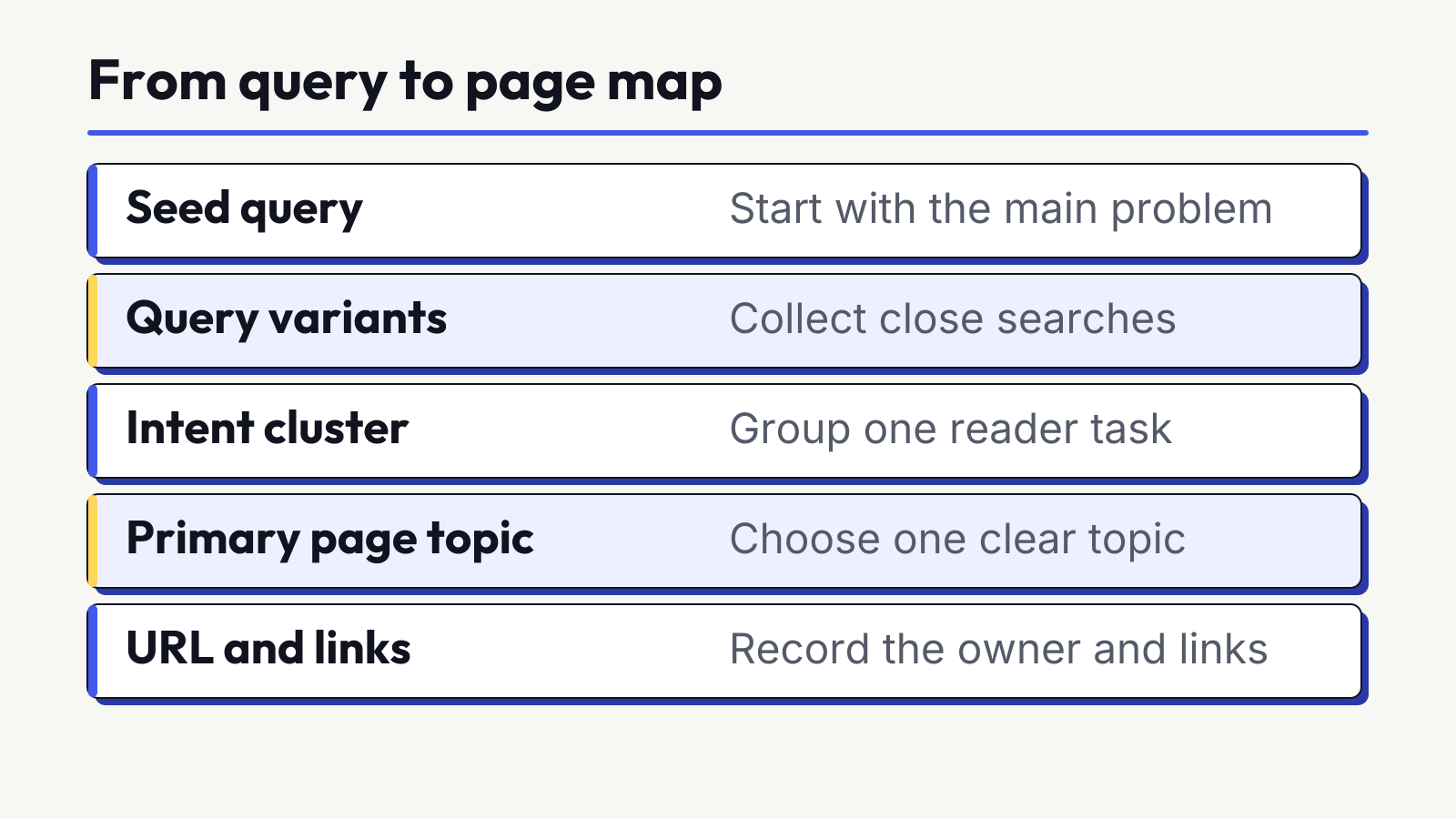
Mapping turns a research cluster into a site decision. For every cluster, find the current owner before proposing a new URL. Search the site, inspect navigation, review relevant Search Console pages and check whether an existing page already satisfies the intent.
| Cluster | Primary query label | Supporting queries | Intent and format | Existing URL | Owner decision | Action |
|---|---|---|---|---|---|---|
| Heat-tolerant balcony plant guide | balcony plants Ahmedabad | hot balcony plants, sunny balcony plants, low-maintenance balcony plants | Informational local guide | None suitable | /guides/balcony-plants-ahmedabad/ | Create one guide |
| Balcony plant shopping | buy balcony plants Ahmedabad | balcony plants online Ahmedabad, balcony plant delivery | Transactional category | /plants/balcony/ | /plants/balcony/ | Improve category |
| Balcony garden service | balcony garden service Ahmedabad | balcony setup service, balcony gardener Ahmedabad | Local service | /services/balcony-gardens/ | /services/balcony-gardens/ | Keep and improve |
| Employment | gardening jobs Ahmedabad | plant nursery jobs Ahmedabad | Employment | None | No owner | Do not target |
Use one of five actions:
- Create: No suitable page exists, the need is relevant and the site can provide a useful answer.
- Improve: A suitable owner exists but needs clearer intent alignment, evidence, depth or presentation.
- Consolidate: Multiple pages compete for the same need and should be merged carefully.
- Leave unchanged: The current owner already serves the need adequately and the evidence does not justify work.
- Do not target: The query is irrelevant, unsupported, navigational to another entity or better served without a new page.
Add internal-link notes only after the owner is clear. A guide about heat-tolerant balcony plants can link to the balcony category when products are genuinely relevant. The category can link back to the care guide for selection help. Use descriptive wording that tells the reader what the destination provides. Do not create repetitive exact-match anchors across every page.
Pro Tip
Search the existing site before adding a URL. A well-matched page with history is often a better owner than a new near-duplicate page created for a wording variation.
Build an Ahmedabad example from query to page
Now follow the fictional plant-shop example through the complete process. No metrics below are presented as current market data. The purpose is to show the decisions and records a beginner should make.
- Define the goal: Help Ahmedabad apartment residents choose plants for hot, sunny balconies while connecting useful guidance to the shop’s relevant product category.
- Collect seeds: Use customer questions about sun, watering, heat and low maintenance, plus existing category language and observed site queries.
- Expand carefully: Add variants around sunny balconies, heat tolerance, low maintenance, containers and Ahmedabad conditions. Remove landscaping jobs and unrelated wholesale searches.
- Inspect results: Record whether current results are guides, product pages, local results or mixed. Note recurring subtopics such as sunlight, plant choice, watering and container drainage.
- Classify intent: Separate selection advice from buying and service enquiries. One guide should not replace a category or a service page.
- Group variants: Put hot, sunny and heat-tolerant balcony plant questions into one informational cluster when live results and page needs align.
- Check ownership: Confirm that the current category is transactional and no suitable guide exists. Do not force the category to carry a long tutorial.
- Assign the owner: Create one proposed guide URL for the informational cluster and keep the existing category as the shopping owner.
- Plan internal links: Link the guide to the relevant category as a next step, and link the category to the guide where selection help is useful.
- Write the evidence note: State the audience, result mix, sources, date, assumptions and why the guide is separate from the category.
The proposed guide brief should answer the selection problem directly. It can explain how to assess sun and heat, compare plant characteristics, consider pot and drainage needs and plan care. It should not be stretched to cover every indoor plant, terrace service and shopping query. Its purpose is a complete response to one coherent need.
The category should remain useful for people ready to browse or buy. It can organise available plants, state delivery conditions and provide relevant filters. It does not need to repeat the guide. This separation gives both pages a distinct job and reduces the temptation to insert the same phrase into two similar pages.
If an older guide already covered the same intent poorly, the decision might change from create to improve or consolidate. The map is not a one-time list. It is an architecture record that should reflect the current site.
Prioritise the page map
A page map can contain more opportunities than the team can execute. Prioritisation should combine audience value, site fit, evidence, demand, current gaps and effort. Avoid pretending that a universal formula can remove judgement.
| Factor | Question | High-priority evidence |
|---|---|---|
| Audience value | Does this solve an important question or decision? | Repeated first-party questions and clear result intent |
| Business or project fit | Can the site support the need credibly? | Relevant offer, expertise, products or primary evidence |
| Ownership gap | Is there no suitable current page? | Inventory confirms a missing owner or a weak existing page |
| Demand evidence | Is there evidence people search for the need? | Several sources agree, with limitations recorded |
| Feasibility | Can the team create and maintain the page well? | Sources, examples, reviewer and update owner are available |
| Dependency | Does another page or technical fix need to happen first? | Category, product, tracking or template dependency is known |
| Effort | What research, production, review and design are required? | Scope is estimated from the actual deliverable, not word count alone |
Use practical waves instead of false precision. A first wave can contain urgent improvements to existing owner pages and a small number of high-fit new pages. A second wave can contain useful opportunities that depend on more evidence or another page. A later or parked group can contain uncertain, low-fit or resource-heavy ideas.
For each decision, add one sentence explaining why it is in that wave. “High volume” is not enough. A stronger note is: “Existing category already serves buying intent, but repeated customer questions and the result mix support one separate selection guide. Sources and a reviewer are available.”
Revisit priority when the offer changes, a current owner improves, a dependency is completed or new first-party evidence appears. The queue should stay connected to the page map so two writers do not independently create pages for the same intent.
Turn the map into a content brief
The page map decides ownership. The brief tells the writer what the owner page must accomplish. Give the writer the key findings and the sources behind them.
- Owner URL and create, improve or consolidate decision
- Audience and situation
- Primary need and a short direct answer
- Primary topic label and useful supporting queries
- Observed intent and suitable page format
- Recurring questions and subtopics from the result review
- Required evidence, sources, examples and reviewer
- Claims to avoid and limitations to state
- Relevant internal links and the reason for each
- Next action, owner and research date
Do not turn the brief into a keyword-density instruction. Google advises writing naturally and anticipating the different words readers may use. It also says there is no magical minimum or maximum word count. Depth should follow the user need, evidence and page format, not a competitor’s length alone.
The content brief can mention one primary topic and supporting variants, but it should not require every phrase in every heading. The writer needs enough freedom to explain the subject clearly. Use the page map to control ownership and the brief to control purpose, not to force awkward repetition.
Check cannibalisation before writing
Cannibalisation occurs when multiple pages compete for the same or substantially overlapping need in a way that weakens ownership and user choice. Similar wording alone does not prove a problem. Review intent, format, content, internal links and actual query-page evidence. Apply the same ownership check when you compare SEO, AEO and GEO, rather than creating duplicate pages for each label.
- Search the site for the primary topic, close variants and related headings.
- List every page that could plausibly own the need.
- Compare each page’s audience, intent, format and next action.
- Review Search Console query and page data where available, while recognising omitted queries and reporting limits.
- Choose one primary owner for each coherent intent family.
- Improve the owner, consolidate overlapping pages or keep genuinely distinct pages separate.
- Update internal links, navigation and the page map after the decision.
| Situation | Likely action | Reason |
|---|---|---|
| Two pages answer the same need with the same format | Choose an owner and consider consolidation | Users and internal links need a clear destination |
| One guide and one product category share words but serve different intent | Keep separate and connect them | Distinct formats and next actions justify separate owners |
| An old weak page has useful history and links | Improve or consolidate into it after review | A new URL is not automatically the better owner |
| A query is relevant but no suitable page exists | Create only when the need and evidence justify it | The gap is real, not a wording variation |
| A query is outside the site’s purpose | Do not target | Relevance comes before demand |
Keyword stuffing is not a solution. Repeating terms unnaturally or out of context to manipulate rankings violates Google’s spam policies. Clear ownership, useful content and descriptive internal links are the relevant controls.
Refresh the research
Keyword research changes because audience language, products, competitors, result formats and tool estimates change. Add a research date and update triggers instead of promising a universal refresh schedule.
- A core offer, category, service area or audience changes.
- Search Console shows new query patterns or a different page receiving impressions.
- The live result page changes format or intent materially.
- Several pages begin appearing for the same query family.
- A planned page is no longer feasible or relevant.
- Seasonality or a product cycle changes the decision window.
- Important source data, regulations or official guidance changes.
Keep a change log. Record the cluster, old owner, new evidence, decision, date and person responsible. When a URL changes, update the page map and relevant internal links. When a query remains useful but the data is unavailable, preserve the qualitative evidence rather than deleting the opportunity.
After publication, compare the owner page with its intended need. Review query and page data, reader behaviour and conversion context where appropriately measured. Do not assume that every new query deserves a new section or URL. Update the page when the variation reveals a genuinely missing need.
Final research check: Before moving a cluster into production, confirm that the workbook records all of the following:
- The target audience, market, language and research date
- The business or learner need the cluster serves
- The source of each important seed and query
- The observed intent and dominant live-result format
- The metric source, settings and any unavailable values
- The cluster name, primary topic label and supporting variants
- The existing URL search and page-ownership decision
- The create, improve, consolidate, leave or do-not-target action
- The evidence and examples needed to make the owner page useful
- The internal-link relationship and reason
- The next owner, priority wave and known dependency
- The condition that should trigger a future refresh
If an important field is still an assumption, label it and assign a validation action. A complete map does not mean every row becomes content. It means every row has a reasoned decision that another person can review and update.
Turn one cluster into a clear owner page.
In SERA’s beginner programme, learners inspect live result pages, collect relevant queries, group terms by topic and entity, classify intent, review suitable pages and build a research workbook and search-intent map. The process is designed to develop evidence-based decisions, not guarantee rankings or traffic.
Frequently asked questions
What is the first step in keyword research for beginners?
Define the audience, offer, geography, goal and existing page type before using a tool. This creates boundaries for deciding which query ideas are relevant and which should be removed.
How can beginners find seed keywords?
Start with products, services, customer questions, support conversations, site search, Search Console and the words used in first-party materials. Keep the source beside every seed.
How many keywords should one page target?
There is no arbitrary number. One page can address a primary topic and many close variants when they share the same intent and suitable format. Separate queries when the user need or page type changes materially.
What is search intent, and why does it matter?
Search intent is the need a query appears to express. It matters because a useful guide, category, service page and product page solve different needs. Inspect live results instead of relying on wording alone.
What is keyword mapping, and how does it prevent cannibalisation?
Keyword mapping assigns each coherent query cluster to one existing or planned target page. The map makes duplicate intent visible and supports create, improve, consolidate or do-not-target decisions before writing.
Research date: 1 November 2026. Search results, tool estimates and platform reports change. Record the country, settings, source and date for every important research decision.