Key takeaways
- A fresher can build credible portfolio evidence through honestly labelled self-initiated, classroom, volunteer and permission-cleared projects.
- Choose projects for the role you want instead of collecting unrelated samples from every channel.
- Show the brief, research, decisions, deliverable, feedback, revision and limitations, not only attractive screenshots.
- Separate actual observations from forecasts, simulated data and untested hypotheses. Never invent performance results.
- Publish the strongest work in a simple mobile-friendly format and test every link, file, label and permission before sharing.
You can build a digital marketing portfolio for freshers without a paying client. Pick a small problem, write down what you tried and show the work you produced. Label practice or simulated projects so employers know what they’re looking at.
Your portfolio is not a promise that you will receive an interview or job. It is a practical record of how you approach a problem, use evidence, make decisions and improve work. That makes the build process as important as the final presentation.
What is a digital marketing portfolio for freshers?
A fresher portfolio is a curated set of marketing projects with enough context for another person to understand your contribution. Each case study should explain what you were trying to solve, what information you used, what you created, what changed after feedback and where the work remains limited.
It is different from a resume. A resume summarises education, skills and experience. A portfolio lets a reader inspect the evidence behind selected claims. It is also different from a certificate list. A completion certificate can document that you finished a programme, but it does not show how you researched a topic, evaluated alternatives or revised a deliverable.
A useful portfolio can contain a mix of briefs, research sheets, audits, content plans, campaign concepts, reporting commentary and presentations. The mix should reflect the role you are exploring. You do not need to cover every channel, and you should not add a weak project merely to increase the count.
What to include without work experience
You need a legitimate brief, not a previous employer. Use sources that let you practise without implying a commercial relationship.
- Self-initiated project: Choose a fictional business or a clearly independent analysis of public information. State that the work was not commissioned.
- Classroom project: Show the assignment context, your individual contribution, feedback received and final revision.
- Volunteer project: Obtain permission, define the scope and remove any information the organisation has not approved for publication.
- Permission-cleared live project: Use a real business only when the owner has approved the brief, data use, screenshots, claims and public display.
- Demo-data analysis: Use an official demonstration environment where available and label it as demo data rather than client analytics.
The Google Analytics demo account is one legitimate source for practising analysis with demonstration data. If you use it, identify the source, date the analysis and avoid implying that you managed the property. For other projects, record every source and distinguish what you directly observed from what you inferred.
Pro Tip
Put the project type beside the title, such as “Self-initiated simulation” or “Classroom project”. A clear label protects trust and gives the reader the right context before they see the work.
Choose projects for the role you want
Start with a role direction, then choose projects that let you practise its recurring decisions. The table is a planning guide, not a claim that one project proves complete competence. Review employer descriptions to match project evidence to local job requirements.
| Role direction | Project to build | Evidence to show | Claim to avoid |
|---|---|---|---|
| SEO | Search-intent map and on-page review | Sources, page observations, prioritised recommendations and internal-link logic | Guaranteed ranking or traffic growth |
| Content | Audience brief, editorial outline and sample page | Audience questions, message choices, editing notes and final copy | Calling untested copy “high converting” |
| Social media | Four-week content plan and community response guide | Platform purpose, content pillars, formats, calendar and response principles | Invented reach, engagement or follower growth |
| Paid media | Draft campaign structure and measurement plan | Audience, creative idea, landing-page match, budget assumptions and tracking logic | Implying a draft campaign was launched |
| Email or lifecycle | Welcome sequence and message map | Trigger, audience state, message purpose, copy and consent considerations | Invented open, click or revenue figures |
| Analytics | Demo-data report with observations and actions | Data source, date range, metric definitions, limitations and reasoning | Presenting demonstration data as client results |
Choose three to five strong projects rather than trying to fill every row. A broad beginner may include one research project, one channel deliverable and one integrated campaign. Someone targeting a clearer role can build two related projects that show increasing depth and one cross-channel project that shows context.
Six portfolio projects you can build without a client
- Customer and positioning brief: Define a fictional or permission-cleared business, customer segment, problem, alternatives and positioning. Include sources, assumptions and one rejected direction.
- Website or landing-page review: Examine message clarity, hierarchy, trust, usability and conversion path. Annotate observations and propose a revised outline. Do not claim that the change will increase conversions without a real test.
- Search and content map: Group queries by intent, map them to suitable pages and create one detailed content brief. Follow official search guidance rather than treating a keyword tool score as a guarantee. The Google Search Central SEO Starter Guide is a useful primary reference for fundamental practices.
- Draft paid-media campaign: Build a campaign concept with audience, offer, creative, landing page, sample budget, tracking and test plan. Mark all figures as assumptions and state that no live spend occurred.
- Social content and community plan: Create platform-specific content pillars, a four-week calendar, sample posts and a response guide. Explain why each format fits the intended audience instead of filling a calendar with random ideas.
- Analytics commentary: Use prepared or demo data to separate observations, interpretations and recommended actions. Include the date range, definitions and data limits. A neutral or negative finding can still demonstrate sound analysis.
For each project, save an editable work product as well as a presentation version. A research sheet, brief, audit, campaign build, calendar or report shows more reasoning than a screenshot alone. If the deliverable contains third-party assets, record the source and confirm that you can reproduce or share them. For a reporting project, use the right digital marketing metrics and state the counting rules alongside the numbers.
Write a case study that shows what you did and why
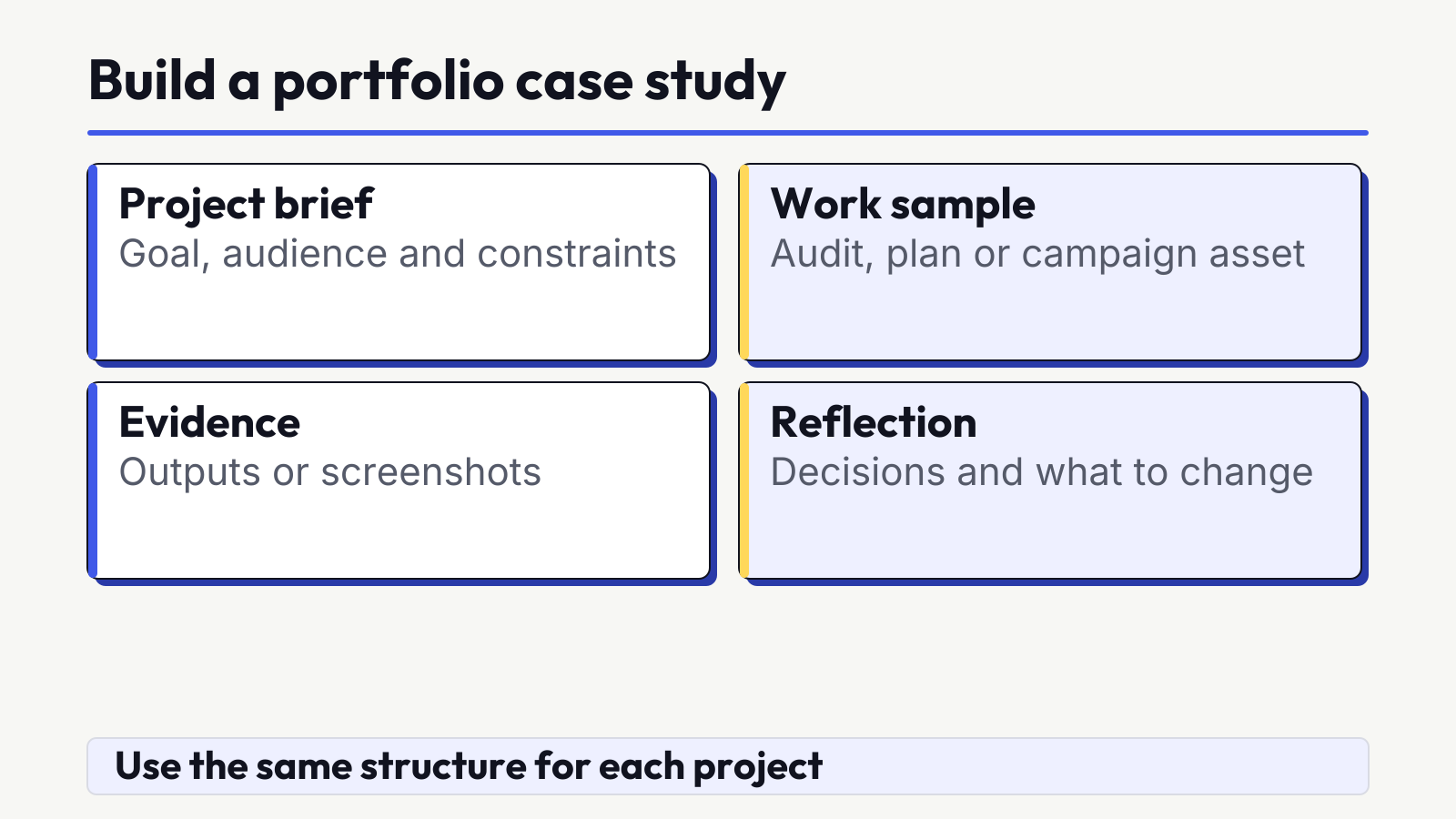
Use the same structure for every project so a reader can compare your thinking. Keep the case study concise, but do not remove the context that makes the work honest.
- Project label: State whether it is self-initiated, simulated, classroom, volunteer or permission-cleared live work.
- Business context: Explain the organisation or fictional scenario and the question being solved.
- Source material: List the research date, inputs, public sources and assumptions.
- Your role: Describe your individual contribution, tools and constraints.
- Process: Show the major steps and the alternatives you considered.
- Deliverable: Link or embed the brief, audit, plan, report, campaign concept or presentation.
- Evidence status: Separate direct observations from interpretations, forecasts and hypotheses.
- Consent and limits: Note permissions, privacy controls, data gaps and what was not tested.
- Feedback and revision: Record what changed after review and why.
- Reflection: Explain what you learned and the next experiment you would run.
For example, imagine a self-initiated landing-page project for a fictional Ahmedabad service business. The brief is to help mobile visitors understand the offer and enquiry path. You review the page hierarchy, write a new outline and explain the message choices. You do not claim a conversion lift because the page was not launched. After feedback, you simplify the opening, add missing trust information and document the revision. That is a complete case story without a fake result.
Label simulated, academic and volunteer work honestly
| Project type | Safe label | Evidence you may show | Permission or limit |
|---|---|---|---|
| Fictional simulation | Self-initiated simulated project | Your brief, research, deliverable and assumptions | Mark invented names, data and outcomes as fictional |
| Public business analysis | Independent analysis using public information | Dated public observations and your recommendations | Do not imply approval, access or a client relationship |
| Classroom work | Classroom project, with individual contribution | Assignment, your work, feedback and revision | Credit collaborators and follow institution sharing rules |
| Volunteer work | Volunteer project for a named or anonymised organisation | Approved brief, deliverable and learning | Get written permission for logos, data, screens and public claims |
| Live work | Permission-cleared live project | Only approved material and accurately defined results | Remove credentials, private strategy and personal data |
Do not publish account credentials, customer records, personal details, unpublished strategy, payment information or screenshots containing private identifiers. Blur or remove sensitive fields and verify the exported file again. Permission to do the work is not automatically permission to publish it.
Pro Tip
Keep a private evidence folder and a separate public portfolio folder. Move only approved, checked material into the public version so confidential source files cannot be shared accidentally.
Show decisions, revisions and limits
A polished final image hides the most valuable part of beginner work. Include a compact decision log that records the evidence, your choice and the reason. Show one meaningful before-and-after revision. Explain what feedback prompted the change and what remains untested.
Not every project needs a positive performance outcome. A neutral finding, rejected hypothesis or corrected error can still demonstrate judgment when the method is sound. If a test was not run, write “proposed next test” rather than presenting a forecast as an achieved result. If data is incomplete, state the gap and narrow the conclusion.
- What did you observe directly?
- What did you infer from that observation?
- Which decision did the evidence support?
- What changed after feedback?
- What could not be concluded or tested?
Choose a simple portfolio format
The best format is one you can maintain and another person can open quickly. Start simple and keep a backup.
| Format | Useful when | Quality check |
|---|---|---|
| Simple website or page | You want one shareable link and easy navigation between case studies | Test mobile layout, loading, contrast, headings and every external file |
| Accessible PDF | You need a stable attachment or offline backup | Use selectable text, logical reading order, alt text and a sensible file size |
| Presentation link | A case study benefits from a concise visual walkthrough | Check permissions, captions, link access and whether it works without an account |
| Professional profile Featured section | You want to surface selected work beside your profile | Use accurate project labels and point to the maintained source |
LinkedIn’s own help documentation explains that its Featured section can display work samples such as posts, documents, presentations, media and external links. Use it as a distribution option, not as a substitute for maintaining the original case study.
Review your portfolio before sharing
- Open the portfolio on a phone and a laptop.
- Test every case-study, document, image and contact link in a signed-out browser.
- Check that project types and individual contributions are clear.
- Remove private data, credentials, hidden comments and unapproved logos.
- Verify source names, dates, metric definitions and image rights.
- Separate actual observations, simulations, forecasts and next-test ideas.
- Proofread headings, captions, tables and file names.
- Confirm that colour contrast, alt text and PDF reading order are usable.
- Put the strongest and most relevant project first.
- Ask one person to find the brief, your role, evidence and result status without guidance.
Ready to check your portfolio before sharing it?
Build a portfolio in 30 days
This is an adjustable work plan, not a promise of employability or a fixed completion time. Reduce the scope if you are studying or working alongside it.
- Days 1 to 7: Choose a role direction, audit your current evidence and write briefs for three projects. Define each project type, source, deliverable and claim limit before making anything.
- Days 8 to 14: Build the first two work products. Save research, decisions and editable files as you go. Request feedback against a short checklist.
- Days 15 to 21: Revise the first projects and build the third. Write each case study using the same evidence-led structure.
- Days 22 to 26: Publish the strongest cases in one simple format. Add accessible captions, alt text, source notes and clear project labels.
- Days 27 to 30: Test mobile and desktop presentation, links, permissions, privacy and spelling. Ask someone to review the path, then make final corrections.
If a project needs more evidence, do not rush it to fit the calendar. Publish fewer complete case studies and keep the next one in progress. Update the portfolio when a stronger revision or genuinely new project replaces weaker work.
How SERA uses portfolio-ready practice
SERA’s beginner programme is designed to develop execution-ready capability through explanation, guided application, feedback and revision. Depending on the unit and learner work, reviewable outputs can include research sheets, briefs, audits, page improvements, campaign concepts, calendars, reports and presentations. A screenshot alone is not treated as sufficient when an editable deliverable can show the reasoning.
The final phase brings channel work together in an integrated capstone, presentation and feedback cycle. A successful learner should be able to present a portfolio-ready campaign and explain decisions, evidence, assumptions and limitations. “Portfolio-ready” describes the intended capability standard. It does not mean every learner automatically completes a public portfolio, and the course does not guarantee placement or income.
Frequently asked questions
Can I build a digital marketing portfolio without work experience?
Yes. Use realistic self-initiated, classroom, volunteer or permission-cleared projects. Label the source honestly and show the brief, evidence, deliverable, feedback, revision and limitations without inventing client results.
What should a fresher include in a digital marketing portfolio?
Include a small set of role-relevant case studies. Each should state the project type, context, sources, your role, process, deliverable, observed evidence, limits, feedback and next test.
How many projects should a beginner portfolio contain?
There is no universal number. Three to five complete, relevant projects can be a practical starting point, but quality and clarity matter more than reaching a fixed count.
Can simulated or classroom projects go in a portfolio?
Yes, when they are clearly labelled. State what was simulated, what you contributed, which data is fictional or prepared, what feedback you received and which outcomes were not tested.
Where should I publish and share my portfolio?
Use a simple mobile-friendly page or accessible PDF that you can maintain. You can also feature selected work on a professional profile, while keeping the original case study available through a stable link.
Research date: 31 October 2026. Platform interfaces and documentation can change, so verify current steps and access before sharing a portfolio.

Mehul Shah
Mehul Shah is the founder and academic director of Sera Digital Marketing Academy in Ahmedabad. He has more than 11 years of experience in SEO, SaaS marketing and agency work. He writes about SEO, AI search and digital marketing, with a focus on how to audit websites, plan campaigns and measure results.